Marine Heading Page
The Marine Heading page is the live monitor for the Marine Heading node: tilt-compensated magnetic heading with continuous, GPS-assisted magnetometer calibration. The node fuses gyroscope, accelerometer and magnetometer data with GPS course-over-ground (COG) and, when available, the ship’s own true-heading feed (HDT). The page shows the fused heading, the health of every input reference, and the state of the two on-line calibrations (hard-iron offset and deviation card).
The page appears under Tools > Marine Heading whenever a Marine Heading node is part of the configuration. See the Marine Heading node reference in the Filters section for the node’s settings.
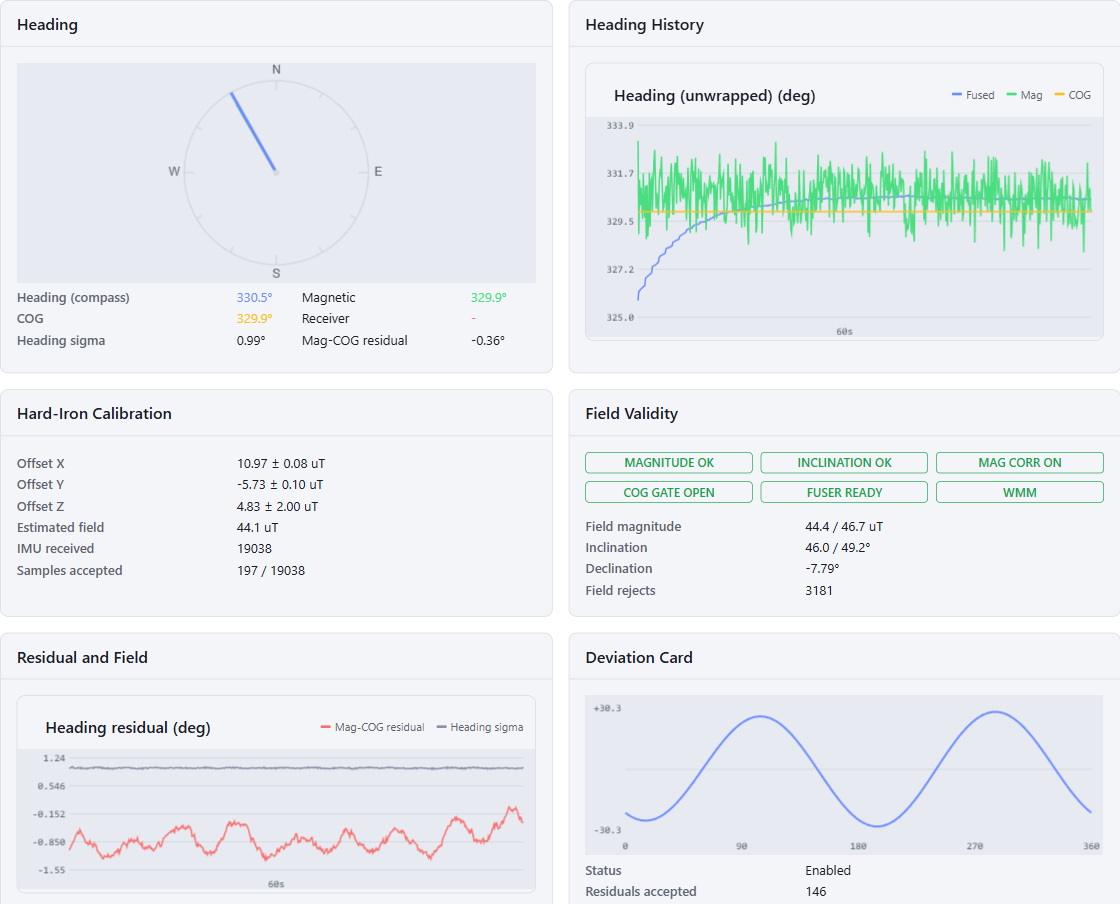
Heading
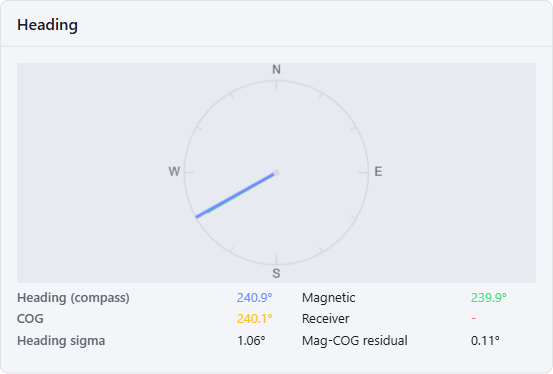
The compass rose shows every heading reference the node knows, each with its own needle:
- Fused (blue, full length) - the node’s output heading. The label in the table shows the mode in parentheses:
initwhile the filter has no absolute heading reference yet,compassonce it runs. - Magnetic (green) - tilt-compensated heading from the calibrated magnetometer, including declination and deviation corrections.
- COG (amber) - course-over-ground derived from GPS positions. Only updates while the COG gate is open (see Field Validity).
- Receiver (red) - true heading (HDT) from the vessel’s own gyrocompass, if the GNSS input carries one and
useReceiverHeadingis enabled.
Below the rose:
- Heading sigma - 1-sigma uncertainty of the magnetic heading. Grows with magnetic disturbance and shrinks as the calibration converges.
- Mag-COG residual - running average of the difference between magnetic heading and COG while underway. A small residual means the magnetic calibration agrees with the GPS track; a persistent offset indicates residual deviation or a crab angle from current or wind.
Heading History
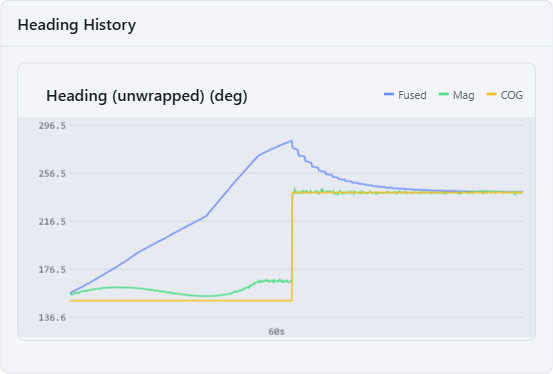
The last minute of Fused, Magnetic and COG headings (unwrapped, so traces stay continuous across the 0/360 seam). The three traces should track each other while underway; the vertical spread between them is a direct read of how well the references agree.
Hard-Iron Calibration
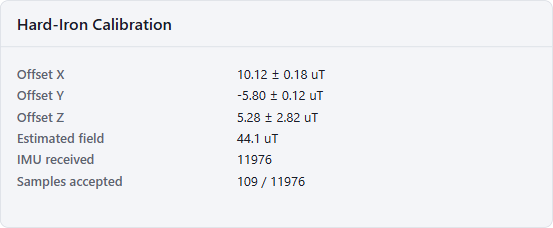
The magnetometer’s hard-iron offset is estimated continuously while the vessel moves, from samples that pass the field validity gates:
- Offset X/Y/Z - the current hard-iron estimate with its 1-sigma uncertainty (uT). The uncertainties shrink as heading diversity accumulates; stable values with small sigmas mean the calibration has converged.
- Estimated field - magnitude of the local magnetic field after hard-iron removal.
- IMU received - total IMU samples consumed.
- Samples accepted - magnetometer samples actually ingested into the calibration versus total received. Samples are only accepted when the field looks clean and the vessel has rotated enough for the sample to add information, so a low ratio is normal.
Field Validity
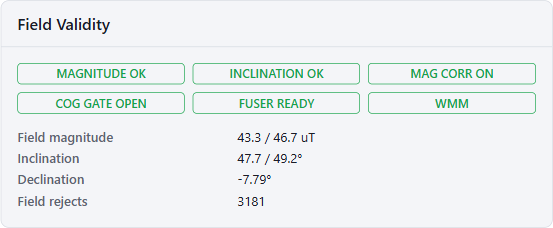
The badges show the gates protecting the heading and the calibration from magnetic disturbance:
- MAGNITUDE OK / REJECT - measured field magnitude is within tolerance of the expected value. A reject means something is distorting the field (nearby steel, electrical load).
- INCLINATION OK / REJECT - measured dip angle matches the expected inclination.
- MAG CORR - whether magnetic heading corrections are currently applied to the fused heading.
ONin normal operation; otherwise the reason the correction is held:DISTRUST(field gates rejecting),RATE(turning too fast for a reliable leveled heading),INNOVATION(magnetic heading disagrees too strongly with the filter and is temporarily gated),RELEASE(the innovation gate timed out and the magnetic heading is re-accepted). - COG GATE OPEN / CLOSED - open when the vessel is underway on a straight, fast-enough track, so COG is a valid heading truth. Closed at low speed and during turns, where COG says nothing about where the bow points.
- FUSER READY / INIT - the internal filter has acquired an absolute heading reference. Until then no heading is output.
- WMM / FIXED FIELD - source of the expected field: computed from the World Magnetic Model at the GPS position, or taken from the fixed values in the node settings.
The table compares measured field magnitude and inclination against their expected values, shows the local declination, and counts how many magnetometer samples the gates have rejected.
Residual and Field
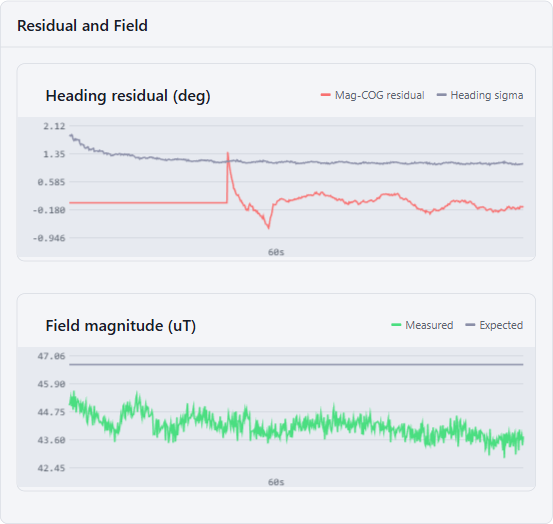
Two live strip charts:
- Heading residual - the Mag-COG residual together with the heading sigma. Healthy operation is a residual near zero, inside the sigma band.
- Field magnitude - measured versus expected field strength. Divergence here is the earliest sign of magnetic disturbance and precedes the gates closing.
Deviation Card
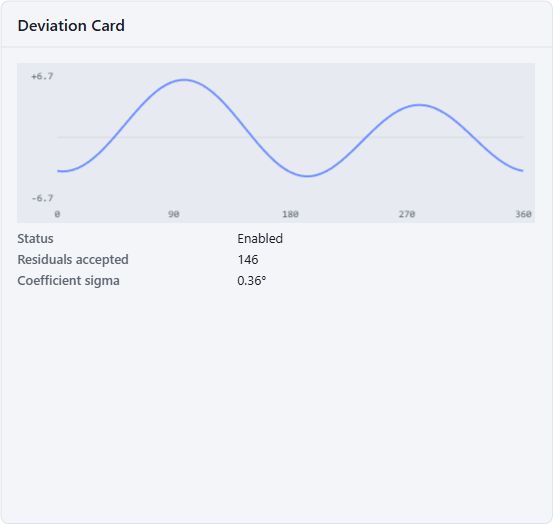
The classic compass deviation card, learned automatically instead of from a manual compass swing. While the COG gate is open, the node fits the heading-dependent residual to a five-coefficient curve (A + B sin + C cos + D sin 2ψ + E cos 2ψ) and applies it as a correction to the magnetic heading. Enable it with the enableDeviationModel node setting.
- Status - whether the deviation model is enabled.
- Residuals accepted - number of gated Mag-COG residuals the fit has consumed.
- Coefficient sigma - uncertainty of the fitted coefficients; the curve is only trustworthy once this is small compared to the curve’s amplitude.
The plot shows the fitted deviation in degrees over compass heading 0-360.
Actions

- Reset Hard-Iron Calibration - discards the hard-iron estimate. Use after the sensor has been remounted or the magnetic environment has permanently changed (structural work, new equipment near the sensor).
- Reset Deviation Card - discards the learned deviation curve.
- Reset Fuser State - restarts the internal attitude filter; it re-acquires heading from the next valid reference. Use if the heading is visibly stuck or was initialized from bad data.
Calibration is persisted across restarts when persistCalibration is enabled, so a reset is the only way to intentionally start over.