Wireless Streaming: Network and Troubleshooting
LPVR-AIR streams the rendered image from the PC to the headset over Wi-Fi through the ALVR Bridge node and receives the headset’s tracking data back over the same link. This page collects the network setup that makes the stream reliable, and the problems that come up most often with the Apple Vision Pro, Meta Quest and VIVE Focus Vision clients. Setting up the headsets themselves is described in Using Headsets with FusionHub.
Network
Use a dedicated Wi-Fi network for the streaming: one router or access point with the PC connected by cable and the headset as its only wireless client, isolated from other traffic. In an environment with little interference this gives a stable stream. A crowded network, for example at an exhibition, limits the bandwidth and causes unpredictable drops in image and tracking quality. The Apple Vision Pro supports Wi-Fi 5.
Router settings that matter, named as on a TP-Link router:
- Turn off Smart Connect, so the headset is not moved between the 2.4 GHz and 5 GHz bands during a session.
- Turn off Airtime Fairness.
- Try different channels to find the one with the least interference at your location.
Reading the stream statistics
The performance tab of the ALVR Control page shows the stream statistics while a client is connected.
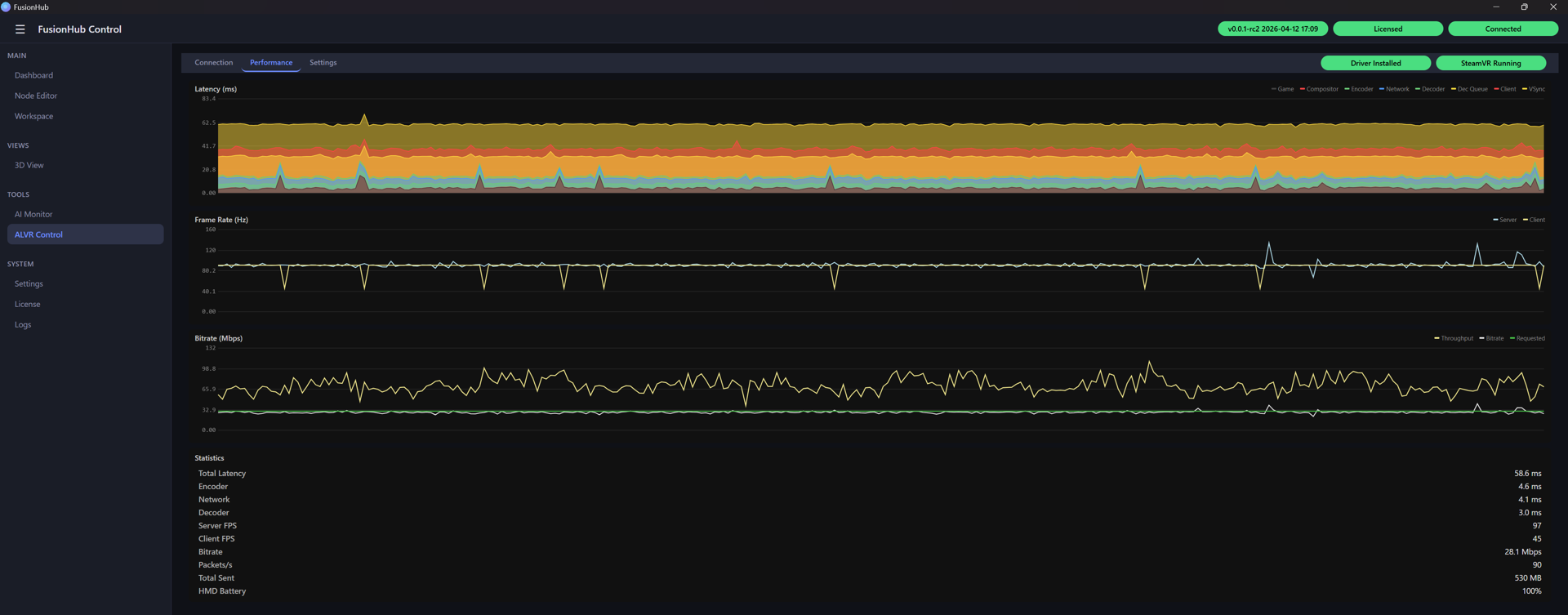
- The latency should be flat and below about 100 ms. In good conditions it is between 70 and 90 ms.
- The client and server frame rates should be equal. The Vision Pro switches between 90 and 100 Hz depending on its flicker detection. If the two rates differ, set the server frame rate in the ALVR settings to the value of the client.
- If the latency spikes or climbs, the network is overloaded or too much data is streamed. Improve the network first. Lowering the bit rate in the ALVR settings also helps, at the cost of image quality.
- If the server frame rate drops while the latency stays flat, the PC is the bottleneck. Advanced Frame Timing in SteamVR shows where the render time goes.
Troubleshooting
| Symptom | Cause and remedy |
|---|---|
| The client does not find the streamer | Headset and PC must be on the same network. Close the client on the headset, quit FusionHub and SteamVR, and start everything again. |
| The client connects and disconnects repeatedly | A permission was refused when the client was started for the first time. Uninstall the client, install it again and grant every permission it asks for. |
| SteamVR reports a session-config parse error after a restart | Harmless. The file is regenerated automatically. |
| Re-entering an application does not reconnect | If the client does not reconnect within about 20 seconds, close it with the cross at the bottom left and start it again. The first start of the application may then show only the passthrough; the second start behaves normally. |
| The headset was taken off | After the connection drops it takes about 20 seconds until the client window freezes and changes colour. Touching or moving the headset reconnects it. |
| The image jitters | Check the stream statistics above. The latency must be flat and the frame rates equal; if not, improve the network. |
| The tracking is worse than the image quality suggests | On the Vision Pro, turn off people awareness under Settings > Awareness & Safety. |